
Whirlpool WFE710H0AH0 — Common Problems, Diagnostics and Repairs
Need the replacement part? Search your model number at for guaranteed fit and fast free shipping.
Understanding the Problem
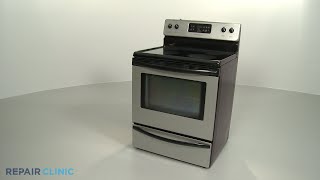
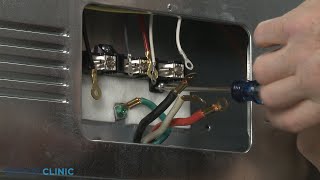
This guide covers the most common problems owners see with the Whirlpool WFE710H0AH0 freestanding electric range (glass-ceramic cooktop, single oven, electronic control). Below are the likely causes for each symptom and clear numbered diagnostic and repair steps you can perform at home. Always disconnect power before starting any repairs. 1) Oven doesn't heat (no bake/broil): a) Quick checks: Verify the range is receiving full power — check the house breaker (double-pole) and the range's power cord/terminal block for loose connections. b) Diagnose bake/broil elements: Remove the oven racks and visually inspect the bake and broil elements for blisters, breaks or burn marks. Use a multimeter set to continuity/ohms to test each element between its two terminals — a good element typically shows low resistance (tens of ohms). Open/infinite or infinite resistance = replace element. c) Check the oven temperature sensor: Locate the sensor (inside the oven upper rear). With the oven cool, remove and test resistance — around 1000 ohms at room temp (typical value ~1080Ω but confirm with your tech sheet). Significant deviation or no continuity = replace sensor. d) Confirm voltage at the element: With power restored and safety observed, measure voltage at the element terminals while calling for bake/broil (be cautious). If full voltage is present but element doesn't heat, element is bad. If no voltage, suspect control board or wiring. e) Control board / relays: If elements and sensor are good and you have correct voltage wiring to the element terminals only when commanded, the electronic control/relays or clock/oven control board may be faulty — consider replacement after confirming wiring. 2) One or more glass-top burners won't heat (or work intermittently): a) Remove the cooktop glass or surface assembly per service manual to access the burner elements and infinite switches. b) Test the surface element assembly for continuity. Test the infinite switch (the control for that burner) for proper continuity between terminals when turned through settings. c) Inspect the element-to-socket connection for corrosion or burned terminals; replace element or socket if damaged. If element & wiring are good but burner doesn't heat, replace the infinite switch. 3) Oven temperature is off (runs too hot/cold): a) Check oven sensor resistance as above — faulty sensor causes bad temp readings. b) Verify oven calibration: Use an oven thermometer and compare. If off by a consistent amount, calibrate through oven settings (refer to manual) — if calibration doesn't correct, replace sensor or control. 4) Control panel unresponsive or displays error codes (F1, F2, F3, etc.): a) Power-cycle the range: disconnect power at breaker for 60 seconds and restore. Temporary glitches often clear. b) If errors persist, look up the error code in the service manual for WFE710H0AH0 — codes commonly map to keypad, control board, temperature sensor, or stuck keys. c) Test keypad/touch panel for shorts and inspect ribbons/connectors between control and user interface. Replace the touch control or main electronic control if indicated. 5) Self-clean won't lock or door won't latch: a) Inspect the door lock assembly and latch for damage or obstruction. Test the lock motor/solenoid for continuity. b) If lock motor gets power during a self-clean command but doesn't actuate, replace the lock assembly. 6) Strange noises (fan, humming, clicking) or cooling fan running constantly: a) Identify whether noise comes from the rear (cooling fan) or under the oven (convection fan). Remove access panels and inspect fan blades for damage and motor bearings for wear. b) Replace faulty fan motors or loose mounting hardware. 7) Smoke or burning smell from cooktop or oven: a) Pull unit forward, disconnect power and inspect for spilled food, grease, or burned wiring behind the range and under the surface. Clean thoroughly. b) Replace any scorched wiring harnesses, connectors, or elements. Step-by-step replacement example — Bake element: 1. Turn off the circuit breaker for the range and verify with a voltage meter. 2. Open oven door and remove racks; locate screws securing the element at the rear of the oven and remove them. 3. Pull the element forward slightly to access the two terminal connectors. Gently disconnect the quick-connect terminals (note their positions or take a photo). 4. Remove the element and install the new one reversing the process. Reconnect terminals, secure mounting screws, reinstall racks. 5. Restore power and test bake function. Safety note: Always disconnect power at the breaker and confirm zero voltage with a meter before touching internal components. When measuring live voltage use insulated tools and follow electrical safety rules. If you're not comfortable with mains-voltage testing or internal electronics, hire a qualified appliance technician.
Common Symptoms
Oven not heating; one or more cooktop elements won't heat; oven temperature runs incorrectly; control panel unresponsive or shows error codes; door lock or self-clean failures; unusual noises or burning smells.
Common Causes
- Failed bake or broil heating element
- Faulty oven temperature sensor or infinite switch (cooktop control)
- Defective electronic control board or poor power/wiring connections
Popular Parts That Fix This Problem
These are the most common replacement parts that fix this problem. When you're ready to order, click below to find the right part at ProsourceParts.com — just search by your appliance model number for a guaranteed fit.

Helpful Repair Tip
Confirm a failed heating element or sensor with a multimeter: test the element for continuity (low ohms) and the oven temperature sensor for near-1000Ω at room temperature; also verify voltage appears at the element terminals when the oven calls for heat.
Frequently Asked Questions
How can I tell if the oven bake element is bad or the control board is bad?
Start by visually inspecting the bake element for breaks or blisters. With power off, remove the element and test continuity with a multimeter — a good element shows low resistance (tens of ohms). Next, restore power and carefully measure for voltage at the element terminals while calling for bake. If you have voltage at the terminals but the element shows open/no continuity or doesn't heat, the element is bad. If the element is good and no voltage is present when the oven calls for heat, suspect the control board, relay, or wiring between the control and element.
The control display is frozen or shows error codes — can I reset it myself?
Yes — first try a power reset: switch off the circuit breaker for the range for 60 seconds and then restore power. This clears transient faults. If error codes return, identify the exact code in the service guide (codes map to specific faults like keypad, sensor, or control). Inspect connectors between the user interface and main control for loose or damaged ribbons. If the control still fails after checks and reset, replace the faulty control or keypad assembly per the service manual.
Related How-To Videos

Real DIY Repair Stories
Be the first to share your repair story!
Share Your Repair Story
Your experience helps other homeowners fix their appliances. Tell us how it went!
Can't Fix It Yourself? Find a Local Technician
It's perfectly okay to call a professional. Some repairs require specialized tools, deep teardowns, or dealing with complex systems that are better left to the pros.

Find the Right Part for Your Appliance
Don't guess — search your exact appliance model number at ProsourceParts.com to find the correct OEM compatible replacement part. They offer fast free shipping, guaranteed fit, and thousands of parts in stock.
Your Free Parts Videos
Whether your dishwasher won't drain, your dryer stopped heating, or your fridge isn't cold, we've created simple repair guides for the most common appliance problems homeowners face. Each guide explains what's going wrong, the most likely causes, and which replacement parts fix the issue. When you're ready to order, we link directly to ProsourceParts.com where you can search by model number and get the right part shipped fast.