
Samsung DV40J3000GW/A2 Dryer Not Heating – What Part Fixes This?
Need the replacement part? Search your model number at for guaranteed fit and fast free shipping.
Understanding the Problem
If your Samsung DV40J3000GW/A2 tumbles but fails to produce heat or dries very slowly, the cause is usually a failed heating circuit component or a power supply issue. Electric dryers need both hot legs of the 240VAC supply and functioning heating elements/thermal safety devices to produce heat, so symptoms often include a spinning drum with no or minimal warmth. Common defective parts include the thermal fuse, heating element assembly, cycling thermostat, high-limit thermostat, or the main electronic control. Debris-clogged vents and restricted airflow can also make the dryer appear to not heat properly; always check venting before replacing parts because poor airflow can trip safety devices and damage the heating element over time.
Common Symptoms
Drum tumbles but clothes remain cold or only slightly warm; drying cycles take much longer than normal; dryer may blow warm air briefly then stop heating; in some cases the dryer trips a breaker or shows error codes.
Common Causes
- Blown thermal fuse (no continuity) caused by overheating or blocked venting
- Open or shorted heating element assembly (broken coil)
- Failed cycling thermostat, high-limit thermostat, or control board interrupting the heating circuit
Popular Parts That Fix This Problem
These are the most common replacement parts that fix this problem. When you're ready to order, click below to find the right part at ProsourceParts.com — just search by your appliance model number for a guaranteed fit.

Helpful Repair Tip
First verify the dryer has 240V at the outlet (two 120V legs). Then unplug the dryer and use a multimeter to check continuity of the thermal fuse and the heating element — an open reading on either indicates the part needs replacing.
Frequently Asked Questions
How do I test the thermal fuse and heating element?
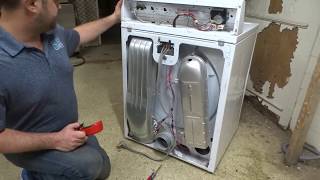
Unplug the dryer before servicing. Remove the back panel to access the thermal fuse and heating element. Use a multimeter set to continuity or ohms: the thermal fuse should show continuity (near 0 ohms); an open reading means it's blown and must be replaced. Test the heating element coils for continuity as well; an open coil means the element is bad. Also visually inspect the element for burned or broken coils.
Can I replace these parts myself and is venting related to this issue?
Yes — many homeowners can replace the thermal fuse, heating element, or thermostats with basic tools (screwdrivers, multimeter). Always disconnect power first and follow a parts diagram for your model. Check and clean the lint filter and exhaust vent before replacing parts: restricted venting causes overheating, which can blow the thermal fuse and shorten element life. If you're uncomfortable working on mains-powered appliances, hire a qualified technician.
Related How-To Videos

Real DIY Repair Stories
Be the first to share your repair story!
Share Your Repair Story
Your experience helps other homeowners fix their appliances. Tell us how it went!
Can't Fix It Yourself? Find a Local Technician
It's perfectly okay to call a professional. Some repairs require specialized tools, deep teardowns, or dealing with complex systems that are better left to the pros.

Find the Right Part for Your Appliance
Don't guess — search your exact appliance model number at ProsourceParts.com to find the correct OEM compatible replacement part. They offer fast free shipping, guaranteed fit, and thousands of parts in stock.
Your Free Parts Videos
Whether your dishwasher won't drain, your dryer stopped heating, or your fridge isn't cold, we've created simple repair guides for the most common appliance problems homeowners face. Each guide explains what's going wrong, the most likely causes, and which replacement parts fix the issue. When you're ready to order, we link directly to ProsourceParts.com where you can search by model number and get the right part shipped fast.