
GE Spacemaker Microwave Light Bulb Replacement – Which Bulb and How to Replace It
Need the replacement part? Search your model number at for guaranteed fit and fast free shipping.
Understanding the Problem
Many GE Spacemaker (over-the-range) microwaves use a small appliance light to illuminate the cooktop. When the light stops working or flickers the bulb itself is most often the problem, but the socket, wiring, or the microwave's control/transformer can also fail. Follow these steps to identify and fix the issue: 1) Identify the exact bulb type: locate your microwave model tag (usually on the door frame or inside the door) and check the owner's manual. If you can't find documentation, remove the lamp and inspect the bulb for markings (wattage, voltage, base type). Common lamp types in Spacemaker units are: a small appliance incandescent (A15 or similar) with a medium/E26 or intermediate/E17 base, or in a few models a low-voltage halogen (MR16/12V) with a transformer. 2) Visual check: power off and unplug the microwave (or turn off its breaker). Remove the lamp cover/grille — typically held by screws or clips — and look for a visibly burned filament or darkened glass. If the bulb is dark or broken, it's almost certainly bad. 3) Swap test: if you have a matching spare bulb, install it and test. If the replacement works, job done. If not, continue diagnosing. 4) Test the socket: with the microwave unplugged, inspect the socket for corrosion, melted plastic, or loose wires. Use a multimeter set to continuity to check the bulb contacts (bulb removed). 5) Check for voltage: with the microwave powered on (use caution) and the bulb socket exposed, measure the AC voltage at the socket when the light should be on. If you see the correct line voltage (around 120VAC for line-voltage bulbs or the transformer's secondary for low-voltage halogen), the socket and wiring are supplying power. If voltage is correct but a known-good bulb doesn't light, the bulb type is wrong or the replacement is incompatible. 6) If there's no voltage: the problem may be a blown fuse, failed door interlock, bad light switch/tactile switch on the control panel, a blown thermal fuse, or a failed control board/transformer. Trace wiring back to the control or transformer and test switches and fuses. 7) Replace defective parts: replace the bulb first if it's burned out. If the socket is damaged, replace the lamp socket assembly. If there's no voltage to the socket, replace the faulty switch, fuse, transformer, or control board as diagnosed. 8) Reassemble and test: after replacing parts, reattach the lamp cover/grille and restore power. Test all light settings and the vent/hood functions. Safety note: always disconnect power before working on the microwave and avoid touching the high-voltage capacitor if you have removed cabinet panels. If you're uncomfortable testing live circuits or removing the cabinet, call a qualified appliance technician. These bulbs are inexpensive; start by matching the bulb type to your model before ordering replacements.
Common Symptoms
Light inside or under the microwave doesn't turn on, flickers, is dim, or works intermittently while the fan/other functions operate normally.
Common Causes
- Burned-out bulb (most common)
- Corroded or damaged lamp socket/wiring
- Failed light switch, thermal fuse, or control board/transformer
- Incorrect replacement bulb type or incorrect voltage
Popular Parts That Fix This Problem
These are the most common replacement parts that fix this problem. When you're ready to order, click below to find the right part at ProsourceParts.com — just search by your appliance model number for a guaranteed fit.

Helpful Repair Tip
Confirm the faulty component by testing a known-good bulb in the microwave; if it still doesn't light, measure socket voltage — no voltage means the issue is wiring, switch, fuse, transformer, or control board rather than the bulb.
Frequently Asked Questions
How do I know which bulb fits my GE Spacemaker microwave?
Check the microwave's model tag (inside the door frame or on the left/right side of the door opening) and look up the owner's manual or parts list. If you can't, remove the existing bulb and read its markings (wattage, voltage, base type). Take the bulb to a hardware store or order a replacement that matches the wattage, voltage and base (E26 or E17 for line-voltage bulbs; MR16 for low-voltage halogen).
Can I replace the microwave bulb with an LED?
Sometimes — you can use an LED replacement only if it matches the bulb's base and the microwave supplies the same voltage (line-voltage 120V bulbs can often be replaced with 120V LED appliance bulbs). Do NOT use a 12V LED without the correct transformer. Also ensure the LED fits behind the cover and is rated for the microwave environment (some LEDs may not tolerate heat/close enclosure). If unsure, replace with the same type and wattage as the original.
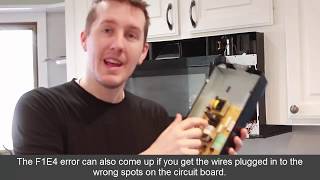
Related How-To Videos


Real DIY Repair Stories
Be the first to share your repair story!
Share Your Repair Story
Your experience helps other homeowners fix their appliances. Tell us how it went!
Can't Fix It Yourself? Find a Local Technician
It's perfectly okay to call a professional. Some repairs require specialized tools, deep teardowns, or dealing with complex systems that are better left to the pros.

Find the Right Part for Your Appliance
Don't guess — search your exact appliance model number at ProsourceParts.com to find the correct OEM compatible replacement part. They offer fast free shipping, guaranteed fit, and thousands of parts in stock.
Your Free Parts Videos
Whether your dishwasher won't drain, your dryer stopped heating, or your fridge isn't cold, we've created simple repair guides for the most common appliance problems homeowners face. Each guide explains what's going wrong, the most likely causes, and which replacement parts fix the issue. When you're ready to order, we link directly to ProsourceParts.com where you can search by model number and get the right part shipped fast.