
Blender Driver Worn or Failed – What Part Fixes This Problem?
Need the replacement part? Search your model number at for guaranteed fit and fast free shipping.
Understanding the Problem
Many blender problems that seem like a 'dead' motor are actually caused by a failed driver—commonly the reusable rubber coupling, drive socket, or drive gear that transfers motor torque to the jar blade assembly. Symptoms include the motor running or humming while the blade doesn't turn, a grinding or slipping noise, or the blade turning intermittently under load. These failures are common on older machines and on blenders frequently used for thick or frozen mixtures. Diagnosing the issue requires isolating whether the motor, the mechanical drive components (coupling/drive socket), or the control electronics are at fault. Mechanical drive parts wear out, crack, or strip teeth; motor brushes (in brushed motors) also wear and can cause intermittent power. High-end blenders with electronic speed controls can have a failed driver board or thermal protection that prevents motor startup. Correct diagnosis avoids unnecessary replacement of the entire base unit.
Common Symptoms
Motor hums but blade doesn't turn; blade spins intermittently or slips under load; grinding, clicking, or plastic-crunching noises from the base; blender works with light loads but stalls on thick mixtures.
Common Causes
- Worn or cracked rubber motor coupling (driver) that disconnects motor torque from the blade assembly
- Stripped or broken drive socket/gear on the motor or jar underside (plastic/nylon components)
- Worn motor brushes or failing motor/driver electronics (brushed motors or control PCB faults)
Popular Parts That Fix This Problem
These are the most common replacement parts that fix this problem. When you're ready to order, click below to find the right part at ProsourceParts.com — just search by your appliance model number for a guaranteed fit.

Helpful Repair Tip
With the jar removed, run the blender briefly: if the motor shaft (or visible drive tip) rotates freely, the coupling or jar-side drive is likely the problem. If the motor only hums and doesn't try to turn anything, suspect the motor brushes or control/driver electronics.
Frequently Asked Questions
How can I tell if the problem is the driver/coupling or the motor/electronics?
Start simple: remove the jar and run the blender briefly. If you see or feel the motor shaft/drive tip rotating, the motor and electronics are working and the coupling/drive socket or jar coupling is the likely culprit. If the motor only hums and there's no attempt to rotate, check power, motor brushes (if applicable), and the control/driver board. A multimeter can confirm whether voltage reaches the motor when running — no voltage points to control electronics, voltage with no spin points to the motor or mechanical coupling.
Can I replace the driver/coupling myself, and what safety tips should I follow?
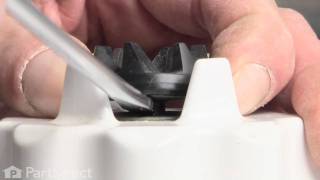
Yes — replacing a rubber coupling or drive socket is a common DIY repair on many blenders. Unplug the unit, remove the jar and any retaining ring, and access the coupling (usually visible at the top of the motor shaft). Inspect for cracks, missing teeth, or deformation and replace with an exact OEM replacement. Wear gloves for sharp blades, and only perform deeper repairs (motor replacement, PCB work) if you are comfortable with electrical safety — otherwise contact a qualified appliance technician. Always match the replacement part to your blender's model number.
Related How-To Videos

Real DIY Repair Stories
Be the first to share your repair story!
Share Your Repair Story
Your experience helps other homeowners fix their appliances. Tell us how it went!
Can't Fix It Yourself? Find a Local Technician
It's perfectly okay to call a professional. Some repairs require specialized tools, deep teardowns, or dealing with complex systems that are better left to the pros.

Find the Right Part for Your Appliance
Don't guess — search your exact appliance model number at ProsourceParts.com to find the correct OEM compatible replacement part. They offer fast free shipping, guaranteed fit, and thousands of parts in stock.
Your Free Parts Videos
Whether your dishwasher won't drain, your dryer stopped heating, or your fridge isn't cold, we've created simple repair guides for the most common appliance problems homeowners face. Each guide explains what's going wrong, the most likely causes, and which replacement parts fix the issue. When you're ready to order, we link directly to ProsourceParts.com where you can search by model number and get the right part shipped fast.